 PassPathways
Study.com college credit comes from self-paced online courses that ACE and NCCRS recommend for credit. You pay a monthly fee, pass with 70% overall, then send a transcript to your school. Study.com isn’t a college, so your school decides what counts. Check with them before you start.
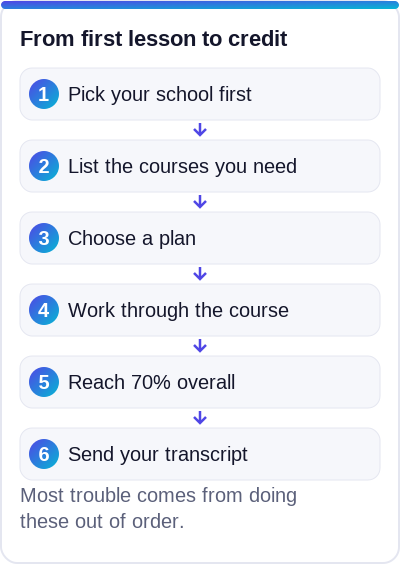
Start with your school’s rules and finish with the transcript, with the plan, course, and 70% in between.
How does Study.com college credit work?
You join a college plan, take video lessons and chapter tests, then finish with a final exam, a project, or both. Once you reach 70% overall, you can request a transcript. Read the full walkthrough in how Study.com college credit works.
Three things catch students out:
- Open-book doesn’t mean anything goes. Study.com checks your identity and bans outside help during exams. See whether Study.com is proctored.
- The plan names changed. College Starter became College Saver, and the old College Saver became College Saver Pro. Older pages may still use the old names.
- Credit isn’t automatic. Your college has the final say, even for a recommended course.
Start here
Pass your course
Course guides and quizzes
- Study.com course guides
- Study.com practice quizzes
- Study.com English 104
- Study.com Statistics 101
- Study.com History 101
- Study.com Math 104
- Study.com Biology 101
- Study.com Chemistry 101
Costs and billing
- Study.com pricing
- How much does Study.com cost?
- Study.com free trial
- Study.com refund
- Cancel Study.com subscription
- Study.com discount code
If something went wrong
- Study.com retakes
- Study.com retake policy
- Failed Study.com final exam
- Failed Study.com course
- How to pass Study.com courses
Move your credit
- Study.com transfer guide
- Does WGU accept Study.com?
- Study.com ACE credit
- Study.com transcript request
Compare your options
Weighing up providers? Read our Sophia vs Study.com comparison. Heading to WGU? See Study.com courses that transfer to WGU and our WGU study guides.
Study.com at a glance
| Fact | What Study.com says |
|---|---|
| Passing score | 70% overall |
| Final exam | 50 questions, 90 minutes, open-book |
| Final exam attempts | Up to 3, with 3 days between attempts |
| Plans | College Saver $95 a month, College Saver Pro $235 a month |
| Courses at a time | 2 on College Saver, 3 on College Saver Pro |
Study.com’s own pages don’t always match each other, so we flag conflicts on each guide. Our sources are official pages, and rules can change, so check before you rely on them.
What’s the path from first lesson to credit?
- Pick your school first. Ask what it accepts before you spend anything.
- List the courses you need. General education courses are usually the safest.
- Choose a plan. College Saver covers core general education courses, and College Saver Pro covers the full library.
- Work through the course. Finish the chapter tests, then any projects and the final exam.
- Reach 70% overall. You can retake tests and exams if you need to.
- Send your transcript. Your school then decides how the credit applies.
Most trouble comes from doing these out of order. Students who pay first and ask their school later are the ones most likely to waste a month.
Who is Study.com college credit for?
It tends to suit people who need flexible hours and can keep themselves on track. You don’t have a teacher setting due dates, so your plan has to come from you. If that sounds hard, set a weekly target before you start.
Stuck on your course? A tutor can teach you the concepts before you start your graded work. Talk to a tutor.
Study.com college credit FAQ
Can you really get college credit from Study.com? Study.com says its courses are recommended for credit by ACE and NCCRS. Your college decides whether to accept them, so ask before you enroll.
Do I need to be in college to take Study.com courses? No. Study.com says you can start before you enroll anywhere and send your transcript later.
Which plan do I need for credit? Study.com says you need College Saver or College Saver Pro. Other plans don’t earn credit.
Does Study.com give you a degree? No. Study.com says it isn’t a degree-granting school. Credit counts through the college you transfer to.
Last checked: October 31, 2026
Related
PassPathways is an independent resource and is not affiliated with Study.com or WGU.
Stuck on your Study.com course?
Guides can only take you so far. A tutor can teach you the hard topics one on one, so you feel ready before your graded work. Tests, exams, and projects stay yours, as Study.com requires.
- Tell us where you're stuck. Share your course and what feels hard.
- We reply on WhatsApp or email. No forms to wait on if you'd rather chat.
- A tutor explains it and builds a plan with you, so you understand the material and pass on your own.
- Original guides, fact-checked against official Study.com sources
- Honest, ethical tutoring: we teach, you do your own work