 PassPathways
The Study.com retake policy gives you up to 3 attempts on each chapter test, final exam, and assignment. Final exams need a 3-day wait between attempts, and your highest exam score counts. Attempts are included in your plan, but you must keep your membership active to use them.
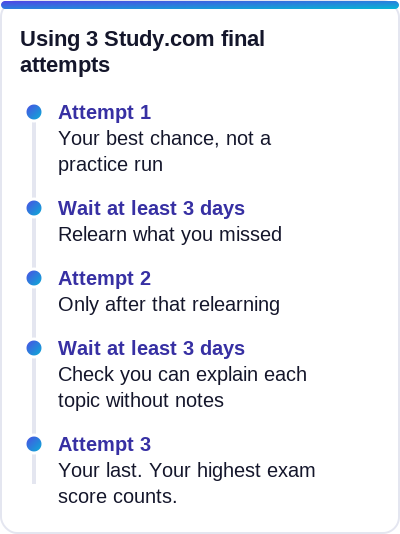
Treat every attempt as real: the two 3-day gaps are study time, and because your highest score counts, a retake can’t lower it.
How many attempts do you get?
| Graded part | Attempts | Wait |
|---|---|---|
| Chapter test | Up to 3 | None stated |
| Final exam | Up to 3 | 3 days |
| Assignment | Up to 3 | None stated |
These figures come from Study.com’s credit course changes FAQ and exam policies. Older pages online mention 2 attempts, but those look out of date. The current pages say 3.
Which score counts?
Study.com says your highest score counts for chapter tests, and your highest exam score counts toward your course total. So retaking can’t lower those scores. That means a retake carries little grade risk, but it does use up an attempt.
For assignments, Study.com says you can revise and resubmit to get a higher score. It doesn’t spell out which submission counts if a later one scores lower, so ask before you replace strong work.
Does a retake cost money?
Not directly. Study.com says all exam attempts are included in your College Saver or College Saver Pro membership. The real cost is time. A 3-day wait may push you into another billing month, which means another $95 or $235.
You need an active plan to take a final exam or resubmit an assignment. If yours has lapsed, you’ll need to reactivate first, so plan your retake around your billing date.
What happens after your last attempt?
We couldn’t find an official answer. Study.com’s pages don’t say what happens if you use all 3 final exam attempts and still sit under 70%. They don’t mention a course reset.
If you’re near this point, email support@study.com before your last attempt. Ask whether any options remain, and keep the reply. Our guide to failing a Study.com course covers what else you can try.
Can you use a second account?
No. Study.com is clear on this. Its one-account rule says limits apply per person, not per account, and that going around them is academic dishonesty. Depending on what happened, it may mark an attempt invalid or refuse credit for the course.
If you’ve already opened a second account, Study.com says to email support with both addresses, so it can review your situation.
What about unenrolling and starting again?
Study.com says you can unenroll and take a course later, but future versions may have new requirements. On College Saver, unenrolling erases your progress. On College Saver Pro, Study.com says your progress is kept.
Don’t assume this gives you fresh attempts. Study.com doesn’t say it does, and it says limits apply per person. Ask support first.
Do older courses follow the same rules?
Mostly, but check your course. Study.com says completed courses keep their old requirements, while new enrollments follow the current ones. If you come back after a break, reactivating moves your credit courses to the new requirements. Your syllabus shows what applies to you.
You’ll also need to pass identity verification before each final exam, including retakes. So keep your ID nearby every time, not just on your first attempt. If you’ve changed computers or keyboards, leave a little extra time in case Study.com moves you to Veriff.
How should you use your attempts?
- Attempt one is your best chance, so don’t use it as a practice run.
- Attempt two should come after you’ve relearned what you missed.
- Attempt three is your last, so take it only when you can explain each topic without your notes.
Our 7-day plan to pass Study.com courses fits around the 3-day wait. Compare the Sophia retake policy if you take courses with both.
Down to your last attempt? Get help before you use it, not after. A tutor can teach you the topics you keep missing. The exam itself stays yours. Talk to a tutor.
Study.com retake policy FAQ
Can you retake a Study.com final exam? Yes. You can take it up to 3 times, with 3 days between attempts.
How long do you have to wait to retake? Study.com says 3 days between final exam attempts.
Can you retake a chapter test? Yes. You get up to 3 attempts, and your highest score counts.
Can you get extra attempts? Study.com doesn’t list a way to get more. Ask support@study.com.
Last checked: October 31, 2026
Related
PassPathways is an independent resource and is not affiliated with Study.com.
Preparing for a retake? Get a targeted plan.
Tell us what you want, and we'll reply with how a tutor can help. We teach and coach. When you're ready, agree to our terms below.
Get startedDon't use your next attempt alone
Study.com limits you to 3 attempts on each final exam. A tutor can teach you the topics you missed before you try again. The exam itself stays yours, as Study.com requires.
- Tell us where you're stuck. Share your course and what feels hard.
- We reply on WhatsApp or email. No forms to wait on if you'd rather chat.
- A tutor explains it and builds a plan with you, so you understand the material and pass on your own.
- Original guides, fact-checked against official Study.com sources
- Honest, ethical tutoring: we teach, you do your own work