 PassPathways
Last checked: November 17, 2026.
Check before you pay for any exam. WGU’s accepted certifications, the exam versions it takes, and its transfer rules change. WGU says its Transferable Certifications list is subject to change and that your Enrollment Counselor has the most current information. Confirm with WGU before you buy an exam.
WGU accepts some industry certifications as transfer credit, including many CompTIA certifications and the Google IT Support Certificate. A certification has to be on WGU’s list for your degree, earned within five years, and still active. You submit it before you start, because WGU awards no transfer credit after your first term begins.
This section is for students, mostly heading into WGU’s IT degrees, who want to know whether an industry certification can count as transfer credit, and which one to earn. Start with your degree, not the certification. WGU decides course by course and degree by degree, so the same certification can clear different courses in different programs. If you already hold a certification, check whether it’s on WGU’s list and still active, then submit it before your first term. If you’re choosing one to earn, compare the WGU courses each one clears with the time and cost of the exam. If an exam went badly, our CompTIA guides cover retakes and what to change. Nothing here replaces your Enrollment Counselor’s confirmation.
Start here if you’re short on time
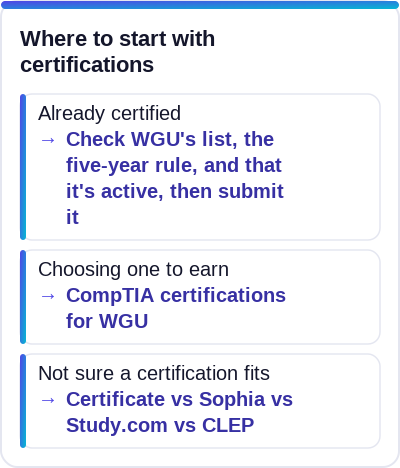
Pick your path by where you are now: holding a certification, choosing one, or still deciding whether to use one at all.
- Already certified? Check it’s on WGU’s list, earned within five years, and active, then read how to submit a CompTIA certification to WGU.
- Choosing one to earn? Start with CompTIA certifications for WGU to see which WGU courses each can clear.
- Not sure certifications are right for you? Compare them with course credit in certificate vs Sophia vs Study.com vs CLEP.
Guides in this section
- CompTIA certifications for WGU: every CompTIA certification on WGU’s list, with hubs for A+, Network+, Security+, Tech+, Linux+, and Cloud+.
- Google certificates for WGU: which Google certificates WGU lists (only IT Support via Coursera) and how to submit one.
- Certificate vs Sophia vs Study.com vs CLEP: when a certification beats a course or exam for earning WGU credit, and when it doesn’t.
Which certifications does WGU accept?
WGU’s Transferable Certifications page lists accepted vendors and, for each degree, the certifications that may transfer. Vendors include CompTIA, AWS, Cisco, Microsoft, ITIL, Linux Professional Institute, PMI, and “Coursera Google”. The page’s content was last modified on August 18, 2025, according to its page data.
- CompTIA: A+, Tech+, Network+, Security+, PenTest+, CySA+, SecurityX, Linux+, Cloud+, Cloud Essentials+, Project+, Data+, and a stackable bundle. See CompTIA certifications for WGU.
- Google via Coursera: only the Google IT Support Professional Certificate. Google Cloud Professional certifications are listed separately. See Google certificates for WGU.
Which WGU courses can a certification clear?
WGU’s Transferable Certifications page names degrees, not courses. Course-level rules appear in WGU’s program transfer guidelines. For example, the Accelerated IT guideline (Catalog 08-2026) says:
| Certification | WGU course |
|---|---|
| CompTIA A+ | D316 IT Foundations and D317 IT Applications |
| CompTIA Tech+ or Google IT Support | E004 Introduction to IT |
| CompTIA Network+ | D315 Network and Security - Foundations, and D325 Networks |
| CompTIA Security+ | D315 and D329 Network and Security - Applications |
| CompTIA Linux+ | D281 Linux Foundations |
| CompTIA Cloud+ | D318 Cloud Applications |
We couldn’t find public guidelines for the standard B.S. IT, Cybersecurity, Data Analytics, or Cloud and Network Engineering degrees. Ask your Enrollment Counselor which course your certification clears in your degree.
What are the rules?
- Earned recently and still active. WGU’s list says certifications must be earned within the last five years. Its guidelines add that they must be active, as determined by the vendor. WGU’s transfer policy treats lifetime certifications as valid for five years.
- Before you start. Send everything by the 5th of the month before your start date, according to WGU’s transcript guide.
- No credit after you begin. WGU doesn’t award transfer credit once your first term starts.
- A 75% cap. All transfer credit together can’t exceed 75% of your program.
How do you submit a certification?
New students email official certification records to certificateinfo@wgu.edu. Each vendor has its own steps. Read how to submit a CompTIA certification to WGU.
How do certifications compare with other credit options?
See the fastest way to earn WGU credits for an honest comparison. Most certifications on WGU’s list are for IT degrees. For general education, you can also look at Sophia, Study.com, or CLEP. See also the WGU 75% transfer rule.
WGU certification transfer FAQ
Can I submit a certification after I start at WGU? Not for transfer credit. WGU says it doesn’t award transfer credit after your first term begins.
Does an expired certification count? WGU’s guidelines say certifications must be active, as determined by the vendor. Check your status before you submit.
Does every certification on WGU’s list clear a course? Not necessarily. Some may only meet admission requirements. Ask your Enrollment Counselor.
Does WGU accept the Google Data Analytics Certificate? It isn’t on WGU’s Transferable Certifications page or in any WGU guideline we read. See Google Data Analytics and WGU.
Related
- CompTIA certifications for WGU
- Google certificates for WGU
- WGU study guides
- WGU transfer credit planning
PassPathways is an independent resource and is not affiliated with WGU, CompTIA, Google, Coursera, ACE, or Credly. Always confirm transfer credit with WGU before relying on it.
Planning your transfer credits? Get a verified roadmap.
Tell us what you want, and we'll reply with how a tutor can help. We teach and coach. When you're ready, agree to our terms below.
Get started