 PassPathways
Last checked: November 3, 2026.
Check before you pay for any exam. WGU’s accepted certifications, the exam versions it takes, and its transfer rules change. WGU says its Transferable Certifications list is subject to change and that your Enrollment Counselor has the most current information. Confirm with WGU before you buy an exam.
To submit a CompTIA certification to WGU as a new student, download the official PDF certificate from your CompTIA account and email it to certificateinfo@wgu.edu. WGU also accepts a CompTIA transcript or digital badge. Send it by the 5th of the month before your start date, because exam results alone don’t count.
What are WGU’s steps for CompTIA?
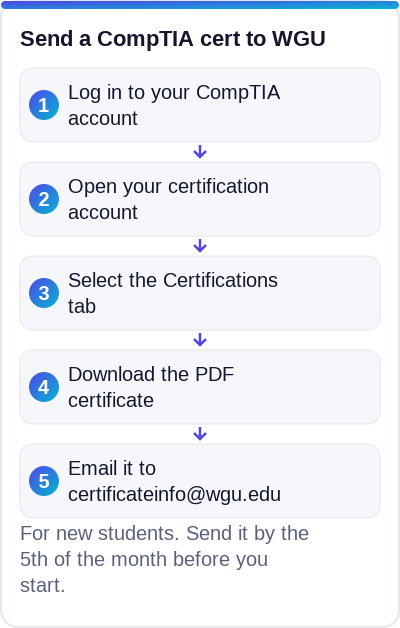
New students download the official PDF certificate from CompTIA and email it to WGU before the 5th of the month ahead of their start.
WGU’s submission guide for new students says:
- Log in to your CompTIA account.
- Open your certification account.
- Select the Certifications tab.
- Download the PDF certificate for each certification. It includes a verification code and a link to CompTIA’s verification page.
- Email it to certificateinfo@wgu.edu.
WGU says you can also verify your status by sending a CompTIA transcript or sharing your digital badge. If you send a transcript, set the “Can be viewed until” date one year ahead, as WGU’s guide says.
How long does it take?
WGU’s guide says a new certification can take up to five business days to appear in your CompTIA account. Allow for that before WGU’s deadline.
When is the deadline?
WGU’s transcript guide says to submit all transcripts and certifications by the 5th of the month before your anticipated start date. WGU doesn’t award transfer credit after your first term begins.
What if you’re already a WGU student?
The new-student steps don’t apply. WGU’s transcript guide says certification scores sent after enrollment for course credit go to scores@wgu.edu, and its submission guide points active students to its third-party exam procedures. Check with your Program Mentor.
What can go wrong?
- Sending exam results instead of the certification. WGU says it can’t accept them alone.
- An expired certification. WGU’s guidelines require it to be active.
- Sending it too late. Missing the deadline can mean no transfer credit.
If you have time, read about what to do after failing any CompTIA exam, what happens when a CompTIA exam version retires, and Cloud+ for WGU students too.
Submit CompTIA certification to WGU FAQ
Where do I email my CompTIA certificate? New students send it to certificateinfo@wgu.edu, according to WGU.
Can I send a screenshot? WGU says it accepts only official copies, like the PDF certificate with its verification code.
How do I know it arrived? Your transfer evaluation results are emailed to you and your Enrollment Counselor. Ask your counselor if you’re unsure.
Related
- CompTIA certifications for WGU
- Does WGU accept CompTIA certifications?
- Should I get CompTIA certs before WGU?
PassPathways is an independent resource and is not affiliated with WGU, CompTIA, Google, Coursera, ACE, or Credly. Always confirm transfer credit with WGU before relying on it.
Planning your transfer credits? Get a verified roadmap.
Tell us what you want, and we'll reply with how a tutor can help. We teach and coach. When you're ready, agree to our terms below.
Get started