 PassPathways
To make a Study.com transcript request, log in and click Request Transcripts on your My Courses page, then choose your transcript type and school. Study.com says it processes requests within 3 business days. You don’t need an active plan. An ACE transcript needs extra steps on Credly, so ask your school which type it wants.
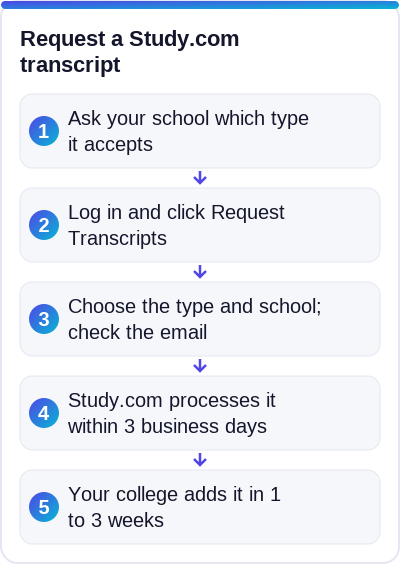
Check the transcript type with your school first, then allow a few business days for Study.com and up to three weeks for your college.
Which transcript do you need?
Study.com offers three types. Ask your school before you choose.
- Direct from Study.com: the simplest route, with no extra steps once you’ve sent the form.
- ACE via Credly: for schools that want ACE. You claim a badge, then request the transcript on Credly.
- Excelsior OneTranscript: for schools that want NCCRS. You also apply to Excelsior.
The “NCCRS via Excelsior” service ended in July 2023. Study.com says its replacement is significantly more expensive, so ask if your school can take a direct or ACE transcript first.
How do you request it?
Where you’ll find the link depends on your account.
- Active College Saver or Pro: log in, then click Request Transcripts on My Courses.
- Active Basic plan: open Manage Membership, then scroll below Change Plan.
- Canceled: log in, then scroll below the Reactivate button.
- Paused: log in, then scroll below Resume your account.
You don’t need to reactivate or resume. That’s handy if you’ve already cancelled your subscription.
Double-check your school’s name and the recipient email. Study.com says a wrong address is a common cause of delay.
How long does a Study.com transcript take?
Study.com says it processes requests within 3 business days, and many go out the same day. Here’s the full timeline for each route.
| Route | Sent out | College adds it |
|---|---|---|
| Direct, by email | Up to 2 business days | 1 to 3 weeks |
| Direct, by mail | 1 to 3 business days, then 1 to 2 weeks in the post | 1 to 3 weeks |
| ACE via Credly | About 1 hour after your Credly request | 1 to 3 weeks |
| Excelsior | Not published | Not published |
Add 1 to 2 days for your final grade to post. An older Study.com article says 1 to 2 weeks for that, so leave extra room if you have a deadline.
What if you have a deadline?
Email support@study.com and address it to the Transcript Coordinator. Study.com says the team will look at your options. Don’t leave it to the last week, though, and remember that your school needs time too.
If you’ve got assignments, your course grade can’t finalize until those are graded. Most are graded within a day or two.
How do you send it to WGU?
Study.com’s support article says to request an official transcript from your dashboard, and that it’s sent within three business days. You can also name a WGU advisor on the form. Its WGU guides say credit should go through ACE or NCCRS, so ask your Enrollment Counselor which one you need. See does WGU accept Study.com? for the deadlines.
What will your transcript show?
- ACE/Credly and Excelsior: Pass or Fail only.
- Direct from Study.com: a percentage with a letter, a percentage with Pass or Fail, or Pass or Fail alone.
If you’re sending it to a partner school, Study.com uses that school’s preferred format. For other schools, you choose. Delivery is by emailed PDF from transcripts@study.com, or by paper mail. The Study.com passing score guide explains what your grade is based on.
What does a transcript cost?
We couldn’t confirm a fee on Study.com’s public support pages. Check your request form before you submit, and ask support if you’re unsure.
When should you request it?
Study.com suggests sending your transcript once you’ve finished your planned courses. That can mean fewer requests, but keep an eye on your school’s deadline. Your ACE credit needs its own Credly steps too. Taking Sophia courses too? See how to send your Sophia transcript.
Can’t send a transcript until you finish? If a course is standing between you and a deadline, a tutor can teach you the hard parts. Talk to a tutor.
Study.com transcript FAQ
How do I get my Study.com transcript? Click Request Transcripts on your My Courses page. The link’s location changes if your account is cancelled or paused.
Can I get a transcript after cancelling? Yes. Study.com says you don’t need an active plan.
Why hasn’t my Credly transcript arrived? You must claim your badge and request the transcript on Credly’s site. Study.com can’t do it for you.
Can a transcript show my grade? A direct transcript can. ACE/Credly transcripts show Pass or Fail only.
Last checked: October 31, 2026
Related
PassPathways is an independent resource and is not affiliated with Study.com.
Planning your transfer credits? Get a verified roadmap.
Tell us what you want, and we'll reply with how a tutor can help. We teach and coach. When you're ready, agree to our terms below.
Get startedIs a course holding up your transfer?
Your credit can't move until you pass. A tutor can teach you the material while you still have time. Graded work stays yours, as Study.com requires.
- Tell us where you're stuck. Share your course and what feels hard.
- We reply on WhatsApp or email. No forms to wait on if you'd rather chat.
- A tutor explains it and builds a plan with you, so you understand the material and pass on your own.
- Original guides, fact-checked against official Study.com sources
- Honest, ethical tutoring: we teach, you do your own work